Murphy Drive Rewards
- 4.7
- Rating
- 5.00M
- Installs
- Free
- Price
 Analysis by App-foxy
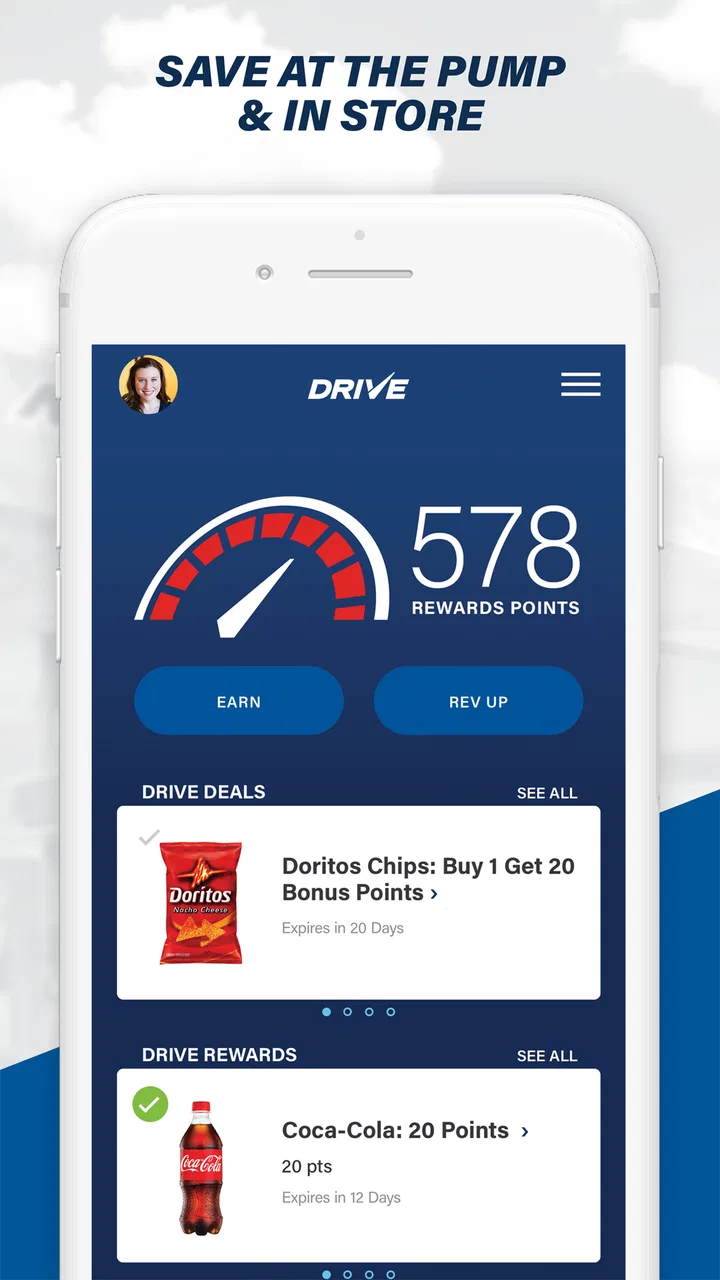
I found Murphy Drive Rewards most useful when I treated it as a quick stop companion rather than a complete food-and-drink shopping tool. It is a free Android app from Murphy USA: REV UP, AMERICA!, built around saving money while buying fuel, snacks, and drinks at Murphy USA locations. The idea is simple, but the value depends heavily on getting the setup right before arriving at the pump.
That distinction matters. A rewards app can look effortless in a store summary, yet the real test comes when I am parked at a busy station, trying to remember whether I signed in, whether a deal is ready, or whether I should complete the purchase first. My experience with this app is that it can make repeat Murphy USA visits more worthwhile, but it is not something I would install casually without spending a moment learning the basic flow.
Where the useful savings meet the first points of friction
The strongest reason to try it is convenience for people who already stop at Murphy USA. Instead of treating fuel and an in-store purchase as unrelated errands, the app brings them into one rewards-focused routine. That makes sense for commuters, parents making frequent short stops, and anyone who regularly buys a drink or snack along with gas.
You May Also Like

 Pandora - Music & Podcasts
Pandora’s Music Is Easy to Start, but Harder to Recover
Pandora’s strength is its low-effort path from a seed to a station. Its weak spot is how much confidence it asks you to place in connection, setup, and quiet recovery.

 8 Ball Pool
 Is Built on Rivalries, Rematches, and Routine
A close look at the rivalries, rematches, shared routines, and unanswered safety questions that turn a quick pool match into a persistent mobile community.

 Samsung Music
’s Quiet Strength Is Playing What You Already Own
Its reach comes less from spectacle than from dependable access to a personal library. That simplicity is both the app’s strongest retention engine and its ceiling.

 AccuWeather: Weather Radar
AccuWeather Review: A Quick, Clear Forecast for Everyday Decisions
For everyday plans, the best forecast is the one you can understand quickly. AccuWeather makes rain timing, radar, and local conditions easy to act on, with a few trade-offs.

 Hill Climb Racing
Why Hill Climb Racing Still Turns Crashes Into One More Run
A tiny car, a bumpy hill and one more upgrade: Hill Climb Racing keeps resurfacing because its simple chaos makes every near-miss feel personal.

 AliExpress - Shopping App
AliExpress Makes Global Shopping Feel Personal, but Shoppers Bear the Risk
AliExpress turns a global marketplace into a pocket-sized discovery engine. Its reach is useful, its shopping loop compelling, and its trade-offs easy to miss.
More From Our News Desk
View All News


The first place users may get stuck is expecting the app to work like a general coupon wallet. It is specifically tied to Murphy USA, so its usefulness is naturally limited outside that setting. If your usual stations belong to several different brands, or if you want one app that compares fuel prices across the area, this is not the right primary tool. I see it as a brand-specific companion, not a universal fuel-saving service.
A second friction point is timing. I would not wait until the moment I am already at the pump to explore the app for the first time. A rewards app is most helpful when I know what it is offering before I begin paying. Even without overcomplicating the process, opening the app ahead of a stop gives me time to check the current deal, sign in if needed, and avoid making a purchase while still trying to understand the screen.
There is also a practical difference between seeing an offer and successfully using it. I recommend reading the wording carefully and checking whether the deal applies to the item I actually plan to buy. A snack promotion is not automatically useful if I only need fuel, and a drink offer may not justify an extra trip into the store. The best savings are the ones that fit a purchase I was already going to make.
The app has a strong public footprint, with an average rating of 4.7 from roughly 175 thousand ratings and more than a million installs. Those figures suggest that the basic concept works for many people, but they should not be read as a promise that every visit will be frictionless. Rewards apps are especially sensitive to account setup, connectivity, store conditions, and whether the user follows the redemption steps in the intended order.
What I would check before relying on a deal
My first check would be the account itself. I would make sure I am signed into the account I intend to use and avoid creating a second account simply because the first login feels slow or confusing. Duplicate accounts can make rewards activity harder to follow, particularly if one account is used on one phone and another is used later.
Next, I would look through the deal details before driving to the station. I would check the eligible purchase, any conditions shown in the offer, and whether the saving is meant for fuel, an in-store item, or both. This is a small habit, but it prevents the most disappointing outcome: completing a normal purchase and only afterward realizing that the offer needed to be selected or presented earlier.
I would also keep the app reasonably current. The current version is 1.31, and the app supports Android 7.0 and later. That broad operating-system support is helpful for people using older Android phones, although an older device may still feel slower than a recent one. Updating the app is a sensible first step if a screen behaves oddly, especially after the phone itself has received a system update.
For iPhone users, I would confirm that the version available for the device matches the current store offering before planning a trip. The important point is not the brand of phone but whether the app opens normally, the account can be reached, and the relevant offer appears before purchase. I would not assume that a problem on one device means the rewards account is broken everywhere.
One of my more useful habits is to open the app while I still have a stable connection, such as before leaving home or while parked safely. I would avoid trying to troubleshoot while standing beside the pump. That approach separates account and app problems from simple signal problems and makes the actual stop faster.
A practical routine for a normal Murphy USA stop
My preferred workflow is uncomplicated. Before arriving, I open the app and review the available savings. I decide whether I am stopping only for gas or whether I also need something from the store. Then I make sure the offer fits that plan instead of changing my shopping just to chase a small discount.
At the station, I keep the phone ready but do not handle it while driving or while the vehicle is moving. If the app requires a deal to be selected or displayed, I do that while safely parked. I then follow the purchase instructions shown in the app and keep the process in the same order from one visit to the next. Consistency is more valuable than trying a different sequence every time.
For a realistic example, imagine a weekday morning when I need fuel and a bottled drink before work. I would check the app at home, see whether the drink offer matches what I want, and decide whether the saving is worth entering the store. At the station, I would handle the fuel purchase and the in-store part according to the displayed instructions rather than assuming the app will connect everything automatically. That takes a little preparation, but it avoids the rushed guesswork that causes most reward mistakes.
The app is also better suited to planned repeat use than to a single emergency stop. If I visit Murphy USA once every few months, I may not remember the process well enough for the savings to feel effortless. If I stop there regularly, the routine becomes easier: check, choose, purchase, and confirm. That is where the app’s convenience becomes more noticeable.
A less obvious trade-off is attention. Saving at the pump and in the store sounds like one benefit, but it can encourage unnecessary browsing. I would set a simple rule for myself: use a deal only when it matches a purchase I already need. This keeps the app from turning a quick fuel stop into an impulse-buying prompt.
How to recover when the workflow breaks
If the app does not load, I would first avoid repeating the purchase blindly. I would check whether the phone has a working connection, close and reopen the app, and confirm that I am still signed in. These are basic steps, but they distinguish a temporary loading problem from an account issue without creating more confusion.
If a deal is visible but does not seem to apply, I would reread the offer and compare it with the item or fuel purchase I am making. The most likely explanation is often a mismatch between the deal and the transaction rather than a total app failure. I would also check whether I completed the required action before paying. Once a transaction is finished, there may be less opportunity to correct a missed step.
If the app becomes unresponsive after an update, restarting the phone and checking for another app update are reasonable next moves. On an older Android device, I would also close other demanding apps and make sure the phone has enough free space for normal operation. I would not immediately delete the app, because that can add another login step and may make recovery less convenient.
When reinstalling is genuinely necessary, I would do it only after confirming that I know the account sign-in details. This is an important preparation step that many people overlook. Reinstalling can refresh a damaged local installation, but it does not help much if I cannot get back into the correct account afterward.
If the problem happens only at one station, I would compare it with another Murphy USA visit before blaming the app. A local connection issue, a busy network, or a station-specific checkout situation can look like a rewards failure. I would note exactly what happened, including whether the offer was visible before purchase, rather than relying on a vague memory later.
One thing I would not do is keep tapping through screens while standing in an unsafe place near moving vehicles. The value of a snack or fuel reward is never worth distracted behavior. I prefer to stop, park safely, and complete the app steps calmly.
When the app is not the cause
It is easy to blame the app when a saving does not appear, but several parts of the experience sit outside the software. The phone may have weak reception. The account may be different from the one used previously. The purchase may not match the offer. Or the app may have been opened only after the transaction was already complete.
That is why I find a simple diagnostic order helpful: connection first, account second, offer conditions third, purchase timing fourth. This order avoids jumping straight to reinstalling or contacting support. It also gives me a clearer explanation if I need help, because I can say which step failed instead of only saying that the reward did not work.
The developer is Murphy USA: REV UP, AMERICA!, and the app’s purpose is closely tied to that retailer. I would therefore compare results within the same brand and location pattern rather than expecting it to behave like a bank app, a general coupon service, or a fuel-price comparison tool. A problem with a particular checkout or station may require attention at the store, while a login or loading problem is more likely to belong to the app side.
Privacy and phone comfort are also part of the decision, even though they are not visible in the headline benefit. I would review the app’s permission prompts and account choices in the normal way I do with any rewards service. If you dislike creating accounts or checking offers before purchases, the small savings may not compensate for that extra digital step.
The Everyone content rating makes the app broadly suitable from an age-classification perspective. That does not mean every child needs it or that it is designed as entertainment; it simply fits an everyday retail rewards use case rather than a mature-content category. For most households, the more relevant question is whether the adult managing fuel and snack purchases will actually remember to use it.
Who gets the most from it, and who should skip it
I would recommend it to regular Murphy USA customers who buy both fuel and occasional convenience-store items. It is especially practical for people who can check an offer before leaving, follow a repeatable process, and keep their purchases aligned with what they already need. The free price removes the financial risk of trying it, provided the user is comfortable with the account and app routine.
I would be more cautious for someone who rarely visits Murphy USA. Infrequent users may spend more mental effort remembering the process than they save. I would also skip it as a main solution if your priority is comparing nearby fuel prices, collecting rewards across many brands, or managing a broad grocery and restaurant coupon collection. A general-purpose alternative may be better for those needs.
Compared with simply paying at the pump, the app adds preparation but can create more opportunities for savings on related purchases. Compared with a general coupon app, it is narrower and potentially easier to understand when I am already at Murphy USA, but less useful elsewhere. Compared with a fuel-price app, it focuses on rewards at one retailer rather than helping me choose among competing stations. That trade-off is the central question: do you value brand-specific savings more than broad comparison?
The app has been available since May 31, 2018, so it is not a brand-new experiment, and its current version remains compatible with Android 7.0 and later. I appreciate that older Android users are not automatically excluded, although compatibility alone does not guarantee a smooth experience on every aging handset. Performance, connection quality, and account access still matter more during an actual stop.
For readers wondering whether it costs anything to install, it is free. I would still judge it by the time it adds to my routine rather than by the download price. A free rewards app is worthwhile only when I can use the offers without making every fuel stop feel like an administrative task.
My practical verdict after using it as a repeat-stop tool
Murphy Drive Rewards works best when I prepare before arriving and use it with realistic expectations. Its appeal is not that it replaces every other shopping or fuel app; its appeal is that it can make ordinary Murphy USA purchases more rewarding when I already intend to stop there.
The main lesson I would give a friend is to establish the routine away from the pump: sign in, review the deal, decide what you actually need, and then use the app safely while parked. If something fails, check connection, account, offer fit, and timing before assuming the software is broken. Those small checks remove much of the frustration.
I would install it if Murphy USA is part of my regular driving pattern, particularly if I often buy drinks or snacks along with fuel. I would leave it off my phone if my stations vary widely, I rarely make convenience-store purchases, or I prefer a single app that compares many retailers. In my view, the real strength is targeted savings with a repeatable routine, not universal shopping convenience.
Overall, Murphy Drive Rewards is a sensible free Food & Drink app for the right customer. Its 4.7 average and large user base show that the approach has broad appeal, while the practical limitations are easy to understand: it is retailer-specific, timing matters, and the benefit depends on using the offers correctly. For regular Murphy USA visitors, that is a reasonable exchange for a few seconds of preparation before each stop.
FAQs for Murphy Drive Rewards
01What is Murphy Drive Rewards and how does it work?
Murphy Drive Rewards is a loyalty app that allows users to earn points with every purchase at participating Murphy USA and Murphy Express locations. These points can be redeemed for discounts on fuel, free snacks, and more. Simply download the app, create an account, and start scanning your QR code at checkout to accumulate rewards.
02How do I earn and redeem points with Murphy Drive Rewards?
Points are earned by making purchases at Murphy USA and Murphy Express stores. For every dollar spent, you receive points that are added to your account. To redeem points, browse the available rewards in the app and select the offer you wish to use. Show the redemption code at the checkout to claim your reward.
03Is Murphy Drive Rewards available for both Android and iOS devices?
Yes, Murphy Drive Rewards is available for download on both Android and iOS platforms. You can find the app on the Google Play Store for Android devices and the Apple App Store for iOS devices. Ensure your device meets the necessary system requirements for seamless functionality.
04Are there any fees or subscriptions required to use Murphy Drive Rewards?
No, Murphy Drive Rewards is completely free to download and use. There are no hidden fees or subscription costs involved. The app is designed to provide value through rewards, and users can benefit from discounts and freebies without any financial commitment.
05What should I do if I encounter issues with the Murphy Drive Rewards app?
If you experience any technical difficulties or have questions about the app, there are several ways to get help. You can visit the 'Help' section within the app for troubleshooting tips, contact customer service via email or phone, or check their official website for more detailed support and FAQs.
Pros
- Easy-to-use interface for quick navigation.
- Generous rewards for frequent fuel purchases.
- Integration with major fuel brands for convenience.
- User-friendly app layout enhances experience.
- Offers exclusive deals and promotions.
Cons
- Limited reward redemption options available.
- Occasional app crashes disrupt usage.
- Some features require location access.
- Limited support for non-fuel purchases.
- Rewards can expire if not used promptly.

Murphy Drive Rewards
Gallery